Spis treści
Configuring PPPOE on the Tenda N300 router
Note. If your router was configured by our employee, you received a piece of paper from us with all the router details. There you will find his address, login and password. If your router has been configured by an external person in ** in this article you will find information on how to connect to it**.
Connecting a router
Right after unpacking the router from the box, connect the computer to one of the ** LAN ** ports (numbered from 1 to 3) using the cable included with the router.

Connect our signal cable to the ** WAN ** port:

Never plug the internet cable into the yellow LAN ports. This can cause serious problems.
Enter the default router address in your web browser, i.e. http://192.168.0.1
PPPoE and WiFi connection setup
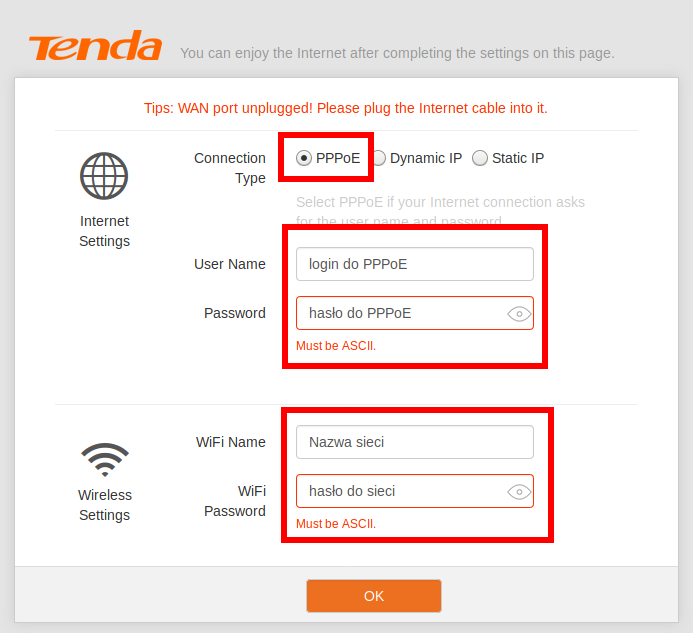
After logging into your router's settings, you'll see a quick setup screen where you should:
- select the type of PPPoE connection
- enter login and password for PPPoE
- enter the name of the WiFi network and its password
Set the password for the router
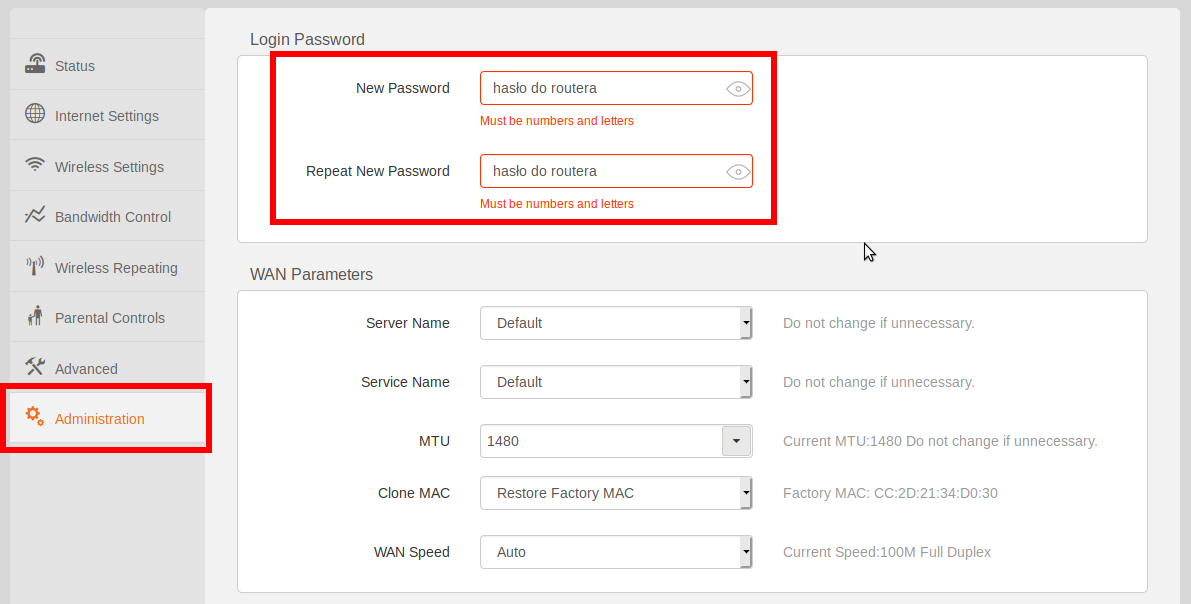
Be sure to change the default router login details. Click on ** Administration ** and then enter the new password twice.
** Never ** do set a password that is the same as your network name, WiFi network login password or any other password that is easy to guess (e.g. your name). Also, do not use special characters. A random password is best. If you do not want to remember a difficult password, set an easy-to-remember string of characters using capital letters and numbers, for example: ** 4SmallCats **
And that's all. Your router is ready to work 